recorded walks
Five rooms. Each walk is a fresh simulated session of the deploy stack: boot at the start mark, one goal, Go, walk, stand.
Learning from Hallucination · Unitree G1
Start with whole-body motion. Build imagined worlds that fit it. Learn a planner that can move a humanoid through new spaces.
Deploy Studio makes the next question visible: does the body follow the plan?
Research in simulation · recorded playback in your browser · no motor commands
See it move
Curated successes from the recorded deployment stack. Play a short film, then open the same walk and inspect it yourself.
The highlight film
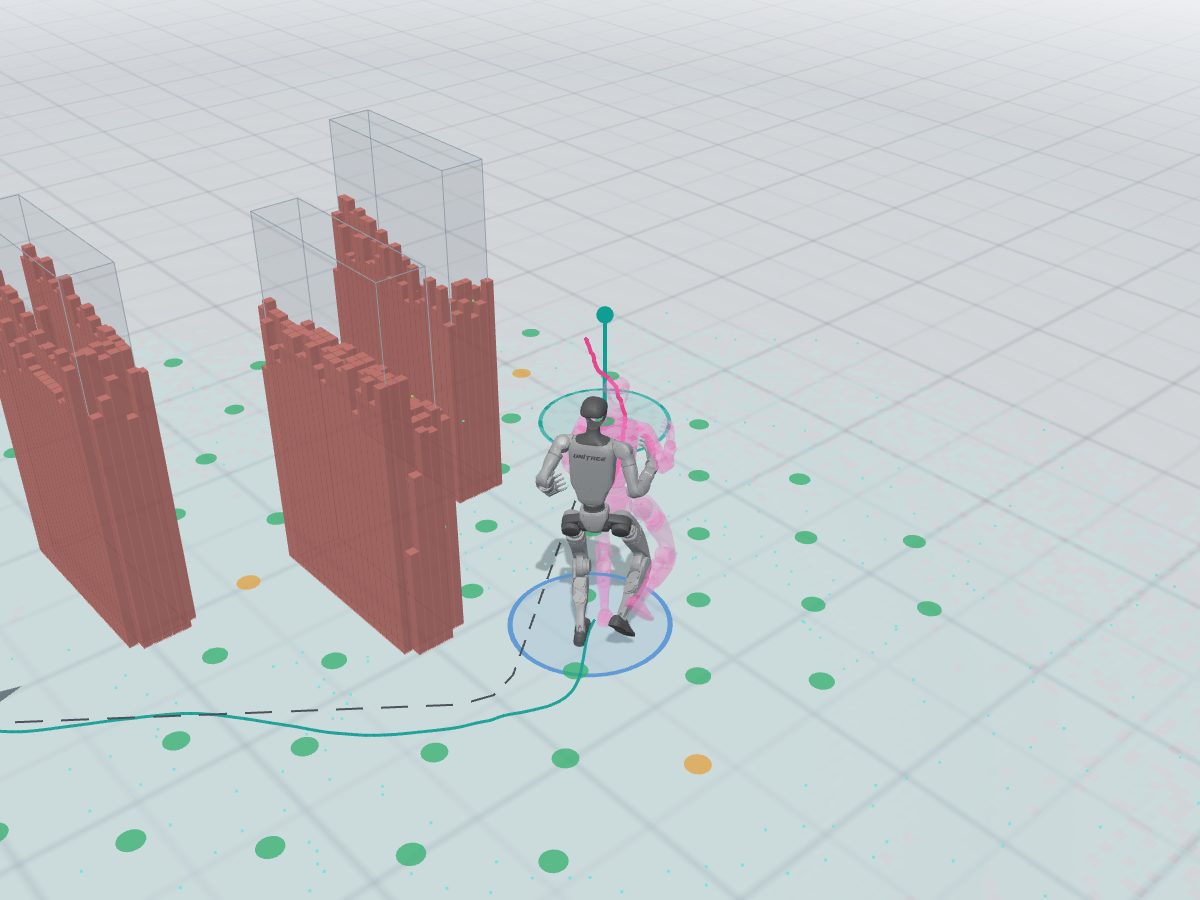
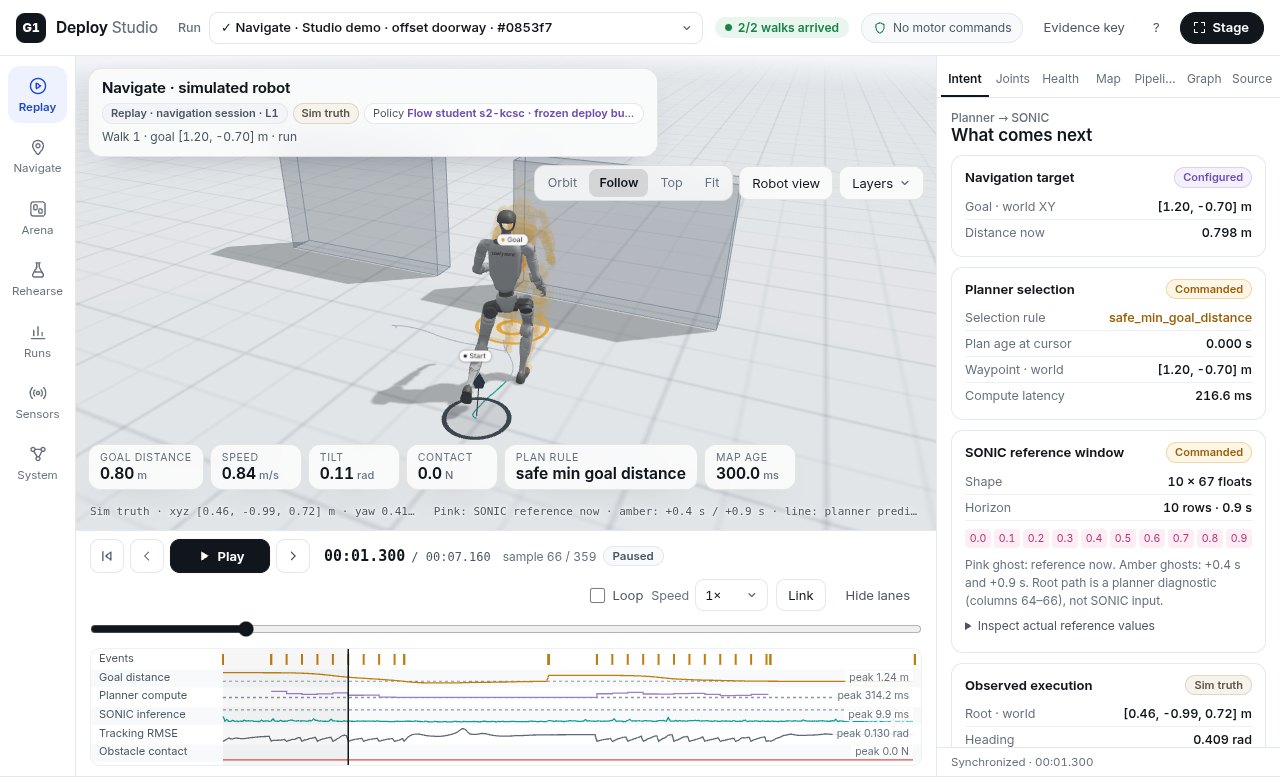
A guided camera follows the recorded body through a doorway, around a wall and into a cluttered room. The motion is the simulation's own output.
Frozen Flow student + SONIC · simulated LiDAR · MuJoCo. Selected successes; no physical-robot footage. Gray: executed body. Pink: planned reference. Captions included.
How Learning from Hallucination fits inLoading the recorded highlights…
Recorded simulation Frozen October 8 planner bundle student-s2-kcsc + SONIC, in MuJoCo. This is the planner bundle pinned for the public Navigate recordings.
One walk each from the doorway, wall-detour and cluttered-room arenas. Eligible walks arrived cleanly, recorded zero obstacle contact, ended within 0.4 m by simulator truth and lasted at most 20 seconds. In each room, choose the farthest goal; break ties by smaller final error, then goal ID. These are selected successes, not an average or a claim about the latest research policy. The complete outcome table and failures remain available.
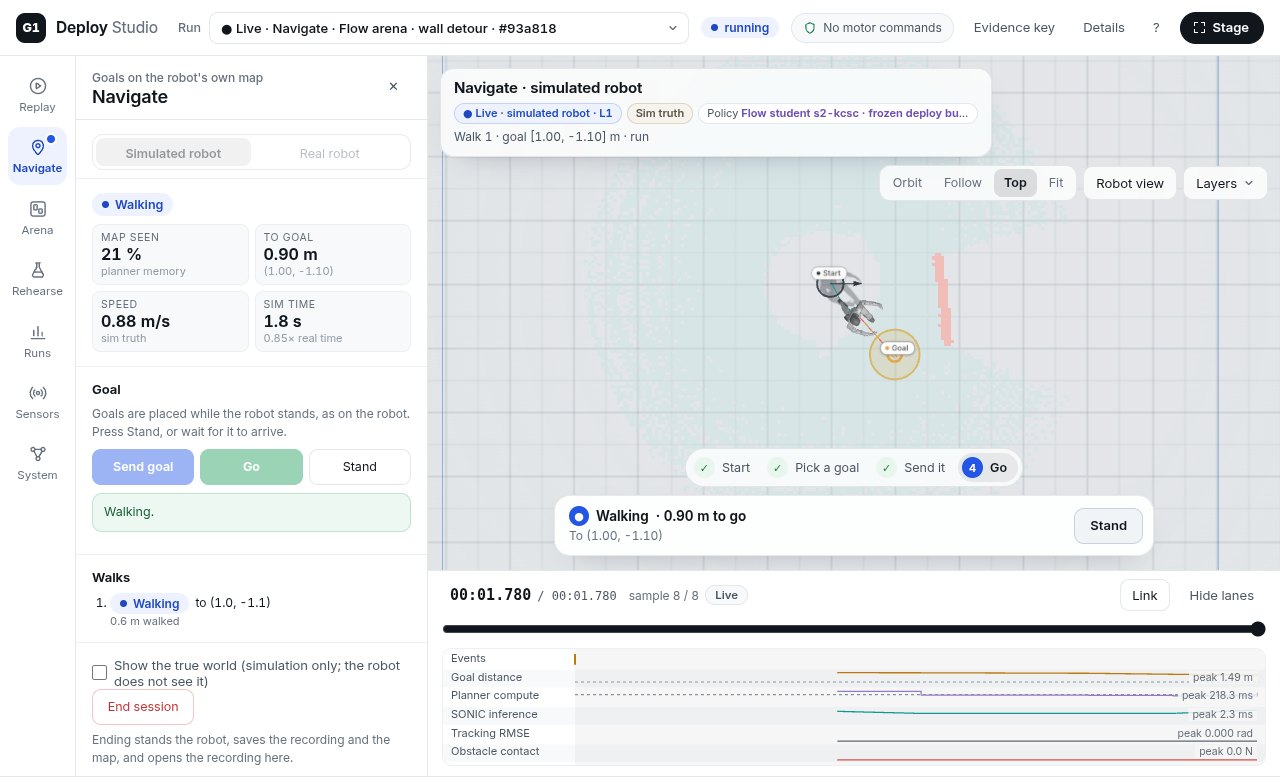
Click the floor of a room to pick a goal, then Send and Go. Or open the room menu and pick a recorded walk.
Click the floor of a room, read the six checks Studio runs before a goal is sent, press Go as the operator does, and watch the walk the deploy stack made.
About 1 MB. Every walk is a recording; your browser runs no policy.Recorded, simulated walks of the real deployment software. A learned planner picks a path through what the robot has seen, a learned tracking controller turns it into joint targets, and the navigation node decides when a walk starts and ends. Goals snap to recorded ones on a 0.4 m grid. What this is, and is not.
The idea behind the planner
Learning from Hallucination (LfH) reverses the usual data-collection problem: take a feasible motion, then construct compatible obstacle scenes around it. This humanoid research applies that idea to the space swept by the whole body.
Explore how a motion becomes a training example, then a plan.
Here, the imagined scenes provide training context. At runtime the humanoid planner uses the supplied map, goal and motion history. The current research pipeline checks predicted execution and may refine the upper-body plan before sending a reference to SONIC. The public Navigate replays above use their explicitly identified frozen student bundle.
LfH was introduced for robot navigation by Xiao, Liu, Warnell and Stone. The original method also hallucinates perception at deployment; the later HLSD work removes that step. Those papers establish the navigation idea; the whole-body adaptation shown here is this project's humanoid research.
Original LfH paper ↗Hallucinated Learning & Sober Deployment ↗
A newer whole-body planner · research replay
Watch a duck under an overhead obstacle and a walk through clutter, from the WXD-TNP-R2 retrieval-free recipe.
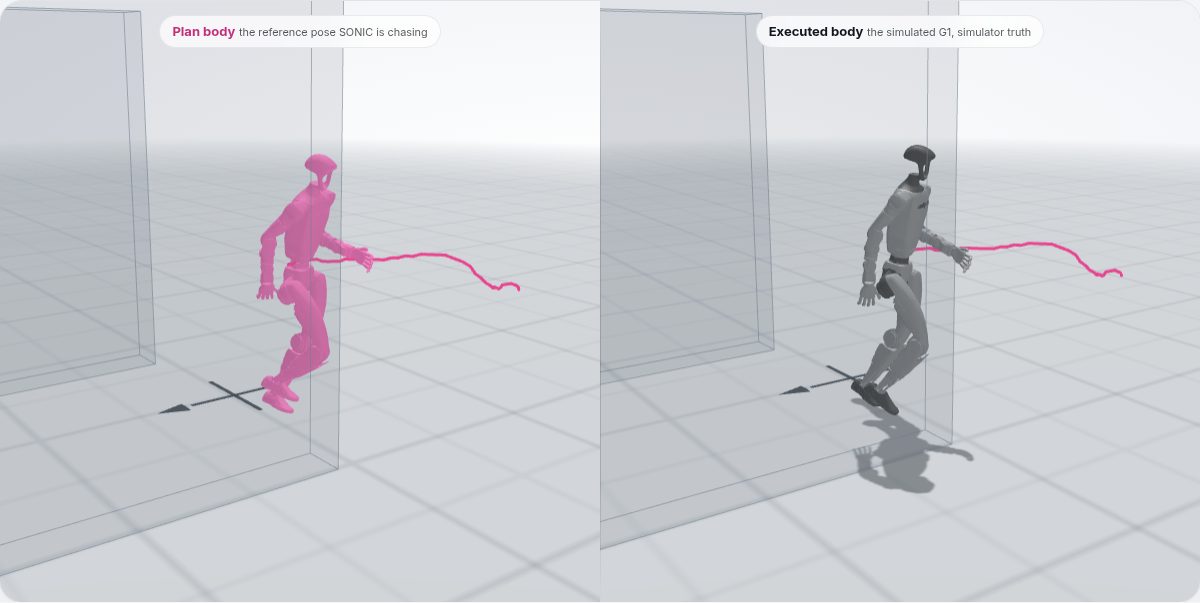
All values from these two selected successful development recordings. Gray: executed body. Pink: planned reference.
Recording details and provenance ↗Two setups, explicitly identified. This research replay uses privileged scene geometry in Isaac simulation and its development arrival rule. The Navigate demo uses the frozen October 8 student, simulated LiDAR and MuJoCo. These selected cases show the newer planner's whole-body behavior; they are not an aggregate comparison between policies.
Get the highlights
These Navigate totals come from the same published recordings the interactive demo plays.
Five rooms. Each walk is a fresh simulated session of the deploy stack: boot at the start mark, one goal, Go, walk, stand.
Arrival is the navigation node's own rule. The site also grades contact and the final distance by simulator truth.
Studio may send a checked goal or a stand. A person presses g. Only the tracking controller writes the motors.
Studio end to end: replay, rehearsal, the arena editor, suites, Navigate with the simulated robot and the real-robot link, and the validation behind it. Captions included.
Recorded on 2026-10-21, before Studio moved to the white design you see here, so Studio's panels are dark in it and the reference ghost it calls cyan is now pink. The data and the controls are the same.
Correction: the video says a walk starts "on the console or the remote". Only g on the node console starts it; the remote's F1 just hands the runner to the node's stream.
Every walk
Each dot is one recorded walk: how far its goal was from the start mark, against how it ended. Switch the measure and the room; move across the chart, or focus it and use the arrow keys, to read a walk.
Take a closer look
One recorded walk on both halves, in step. Pick a scenario; drag to turn both cameras; step frame by frame.
How it works
On the robot day everything runs on the deploy PC next to the G1. Studio attaches on loopback: it listens to the streams, and it may send node.py a checked goal or a request to stand. Click a part to see what it does.
Scroll the diagram sideways to see all of it.
goal to node.py, only after the checks pass and only while the robot stands stillstand to node.pystatus requests, to read the goal backgo: the operator presses g on the node consolequit, or anything to the SONIC runnerExposure today: Studio binds only loopback, but node.py (tcp://*:5562, which accepts go and quit, and *:5556), the SONIC runner (*:5557) and the LIO bridge (*:5561) bind every interface. Proposal U3 to the deploy repository would bind node.py's two to loopback; the runner and the bridge need the same. Until then, firewall the robot network.
A day with the real robot
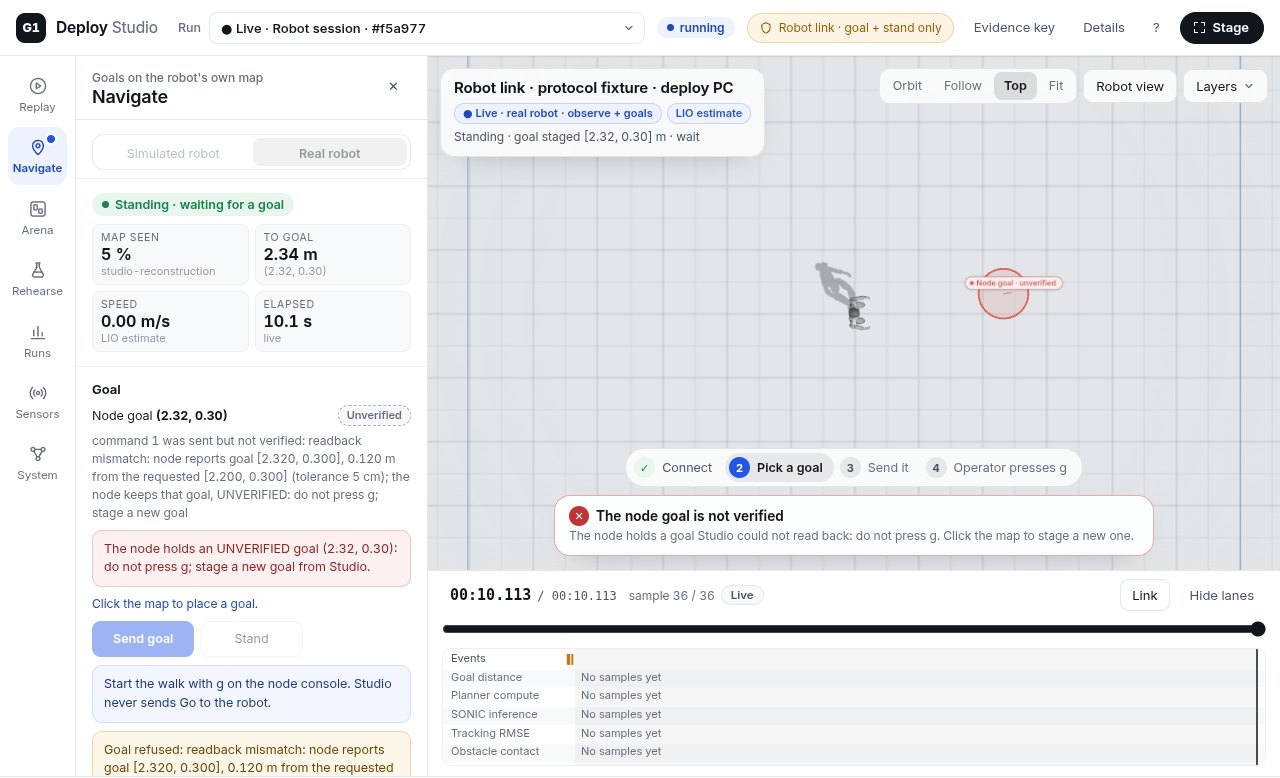
What deploying this suite looks like, step by step, with Studio's real pre-Go checklist. Break things with the switches and watch which check stops you. The rules and messages are the robot link's; the robot is a recorded simulated walk, shown the way Studio shows a real one: as its LIO estimate.
What rehearsing found
Running hundreds of simulated walks before a real one is the point. These came out of it. Where there is an example, it is one of the recordings in the demo.
One grade per walk, the first that applies: a fall or E-stop, then contact over 100 N2, then more than 0.6 m from the goal by simulator truth3. Click a count to open those walks in the demo. Simulation, one seed per goal: not a hardware result.
Questions
Yes: the deploy stack's own planner and tracker, recorded in simulation. The walks were made by the deploy stack's software: the frozen Flow student planner and the SONIC tracking policy, with Studio's reproduction of node.py's state machine, in MuJoCo with a simulated MID-360 LiDAR and the robot's deploy settings5. Your browser replays those recordings. Nothing here ran on a real robot.
So that no weights leave the research machine. A live policy in the browser would publish the SONIC release weights (NVIDIA Open Model License; the deploy repository deliberately does not redistribute them) and an export of the unpublished student planner, and download about 100 MB. Recording every reachable goal once keeps the weights on the research machine and makes the page work on a phone. Studio itself runs the stack live, locally.
Arrived by the robot's own estimate. node.py's rule: its own pose estimate is within 0.4 m of the goal1. That is not the whole story, so every walk is also graded by contact2 and by the final distance by simulator truth3.
Not yet on hardware. Studio's Deploy workspace relays the operator's presses (Arm, Start SONIC, Clear map, Send goal, GO) to the deploy kit's console, which owns the robot and every gate; it has run end to end in Practice on the real deploy chain in simulation, not on the robot. Navigate's robot link is tested against a protocol fixture. Readiness checklists and parsed code are not hardware verification.
More than 100 N against an obstacle, at any moment. The simulator's contact force between the robot and an obstacle. A walk is flagged when it exceeds 100 N at any frame2. The node's outcome does not see contact, so most such walks still "arrive".
The pose the tracker is chasing. The reference pose SONIC is tracking at each instant: 29 joint angles and an orientation, from the plan. Its pelvis position is the planner's and SONIC never receives it, so the body can fall behind or beside it4. Turn it on in the demo with B.
Almost: to any recorded goal. Goals snap to recorded ones on a 0.4 m grid, every walk starts from the start mark, and each goal was recorded once with one seed. Spots that fail Studio's checks show why; that is what Studio would refuse to send.
Posters first. 3D and video on demand. Static files from GitHub Pages; nothing runs on a server. The page starts with text, images and compact recording summaries. Starting the demo loads about 1 MB for three.js, the robot and a room, then about 60 kB per walk. Highlight films download only when played and pause when hidden or scrolled away.
Use it
The page above is a demo of one workspace. This is the tool: it runs on loopback on the deploy PC.
git clone https://github.com/linjiw/g1-deploy-studio
cd g1-deploy-studio
python3 -m venv .venv
.venv/bin/pip install -r requirements.txt
npm ci
.venv/bin/python -m studio.server --port 8790
# then open http://127.0.0.1:8790/
What you get from this repository alone: the gateway, the browser app and the tests; Replay draws the robot only when a recording points at a local G1 model. Rehearsals, Navigate's simulated robot and the robot link read the deploy stack (g1-student-deploy with the Flow student bundle and the SONIC policy), which is not public. No recordings, weights or robot meshes ship with the code.